Skip to content

Trustwelt

Identity is not enough.

Passwords get phished and MFA prompts get approved by mistake. Trustwelt looks at the person, the device they are on and the state of that device before access is trusted. It also lets a team use company logins without anyone ever seeing the password.

IdentityWho is asking
DeviceWhich enrolled computer
ContextIts posture, and how fresh
DecisionMade on the server

What Trustwelt is

A login proves who. It does not prove what they signed in from.

Trustwelt binds a person to an enrolled device, reads the state of that device and turns the two into an access decision on the server. The browser and the device can present evidence; they cannot declare themselves trusted.

For an organisation, it also holds the shared logins that usually sit in a spreadsheet: the social media accounts, the supplier portals, the infrastructure consoles. People are granted use of a login. The browser extension on their enrolled device signs them in. The password is never shown.

  • Device identity and posture
  • Company logins without reveal
  • Access matrix per role
  • Signed remediation, no remote shell
  • Desktop vault, free, no account
  • Usage audit for company items
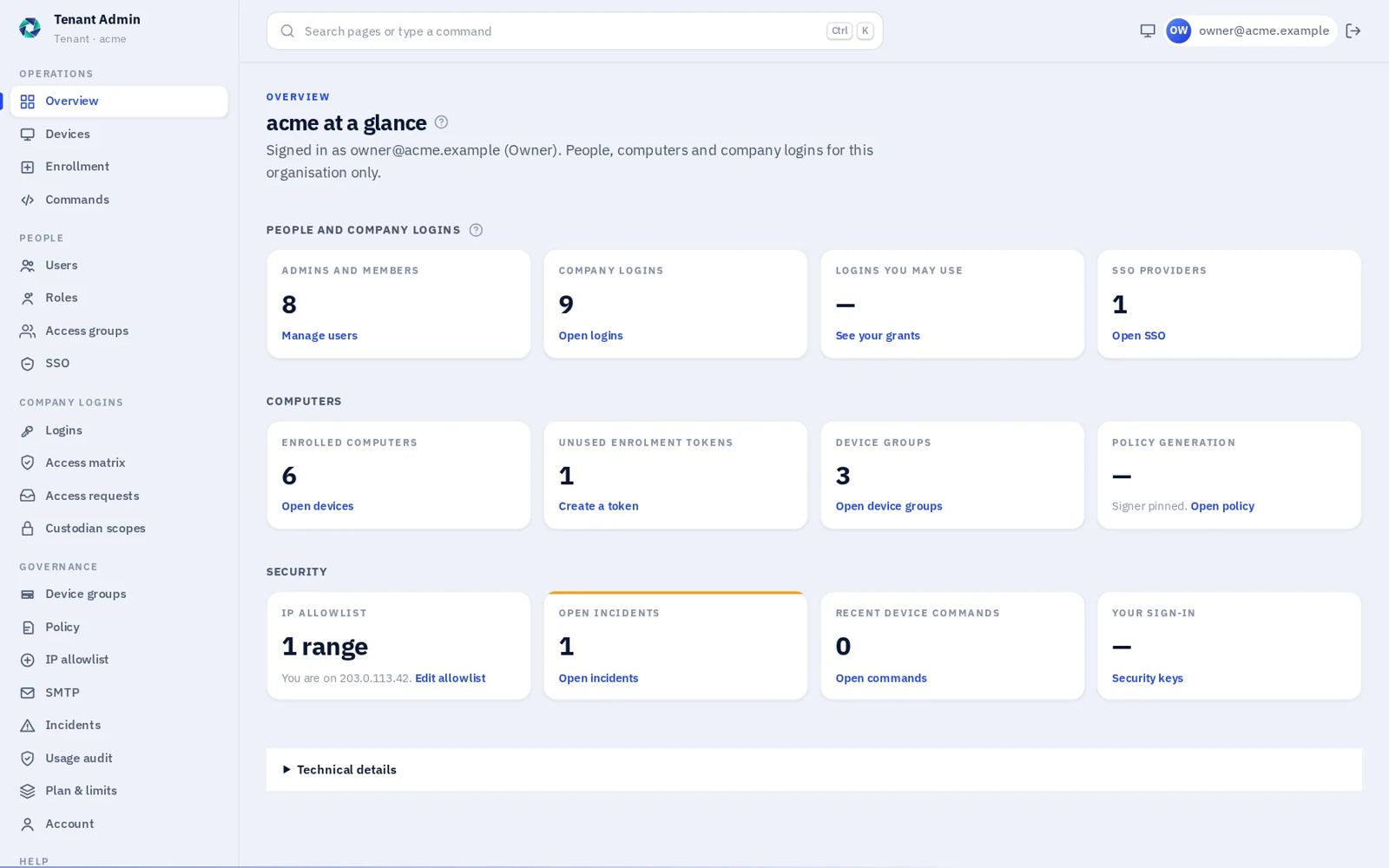
Trustwelt Tenant Admin overview: people and company logins, computers, and security, as linked tiles

Status: Trustwelt is in private preview. There is no public sign-up, and nothing on this page is described as available before it is. Every screen shown is the real product on sample data.

Three places

Three places, one set of rules.

People keep their own secrets in the desktop app. Their account lives in the Portal. Administrators run the organisation in Tenant Admin. Each has its own sign-in, and none of them can show a password it does not hold.

Everyone

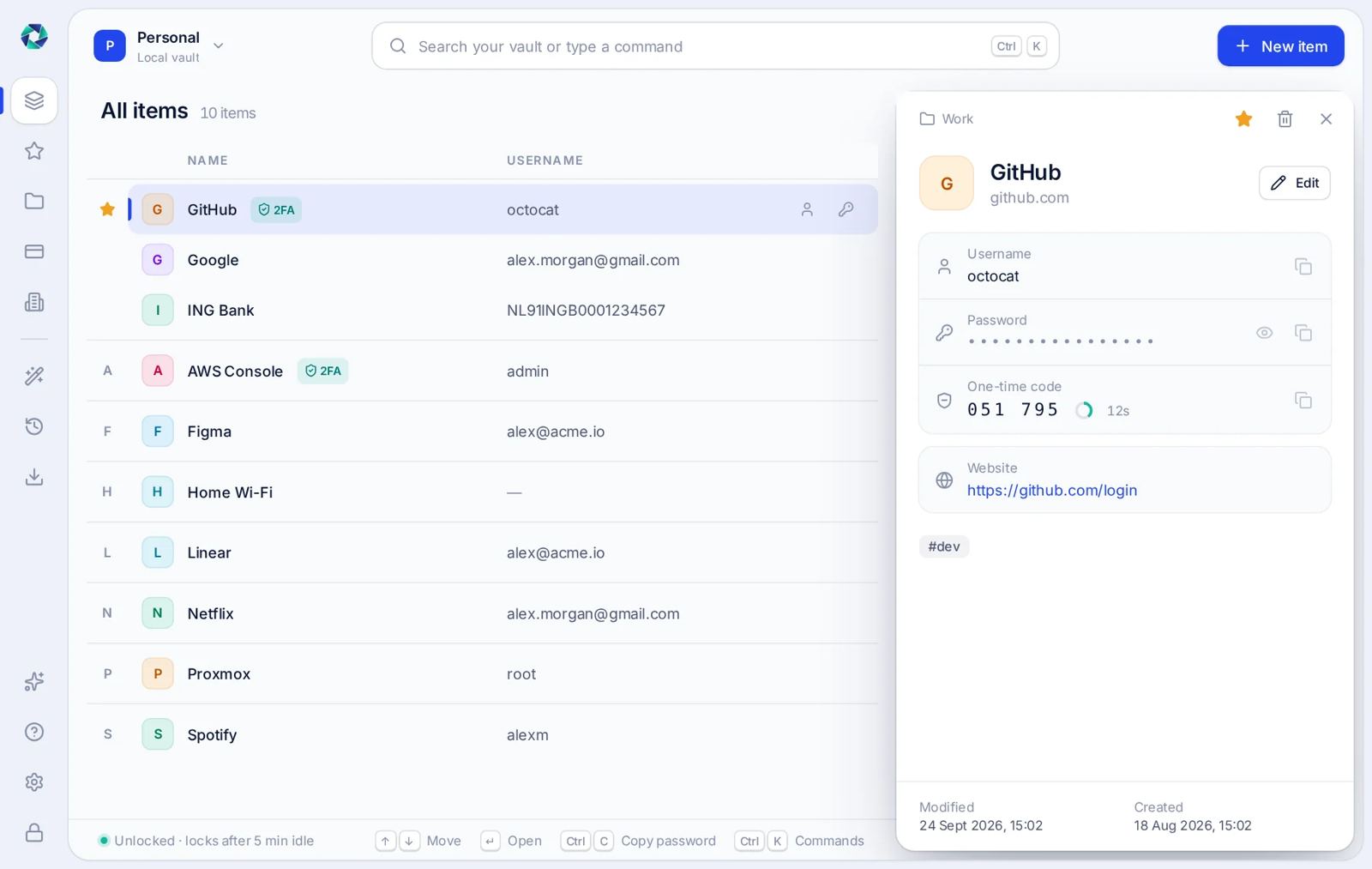
Vault Lite desktop app with a list of logins and one open, its password hidden and a one-time code counting down

Vault Lite

A desktop vault for passwords, one-time codes and cards, encrypted on your own computer. Free, with or without an account.

Every account

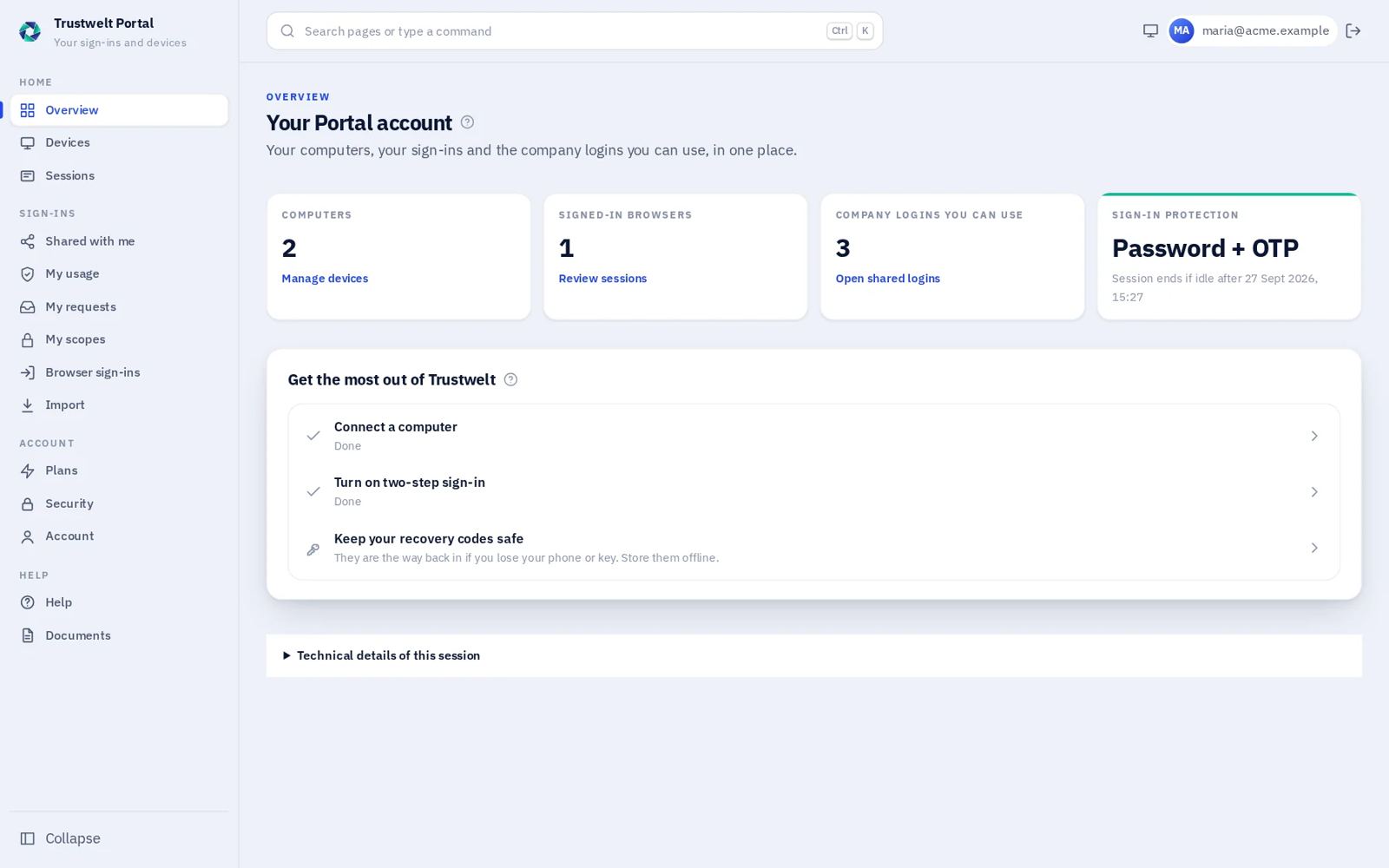
Trustwelt Portal overview: computers, signed-in browsers, company logins you can use, and next steps

Portal

Your computers, your sessions, the company logins shared with you, and your plan. Two-step sign-in or a security key protects it.

Business and Enterprise

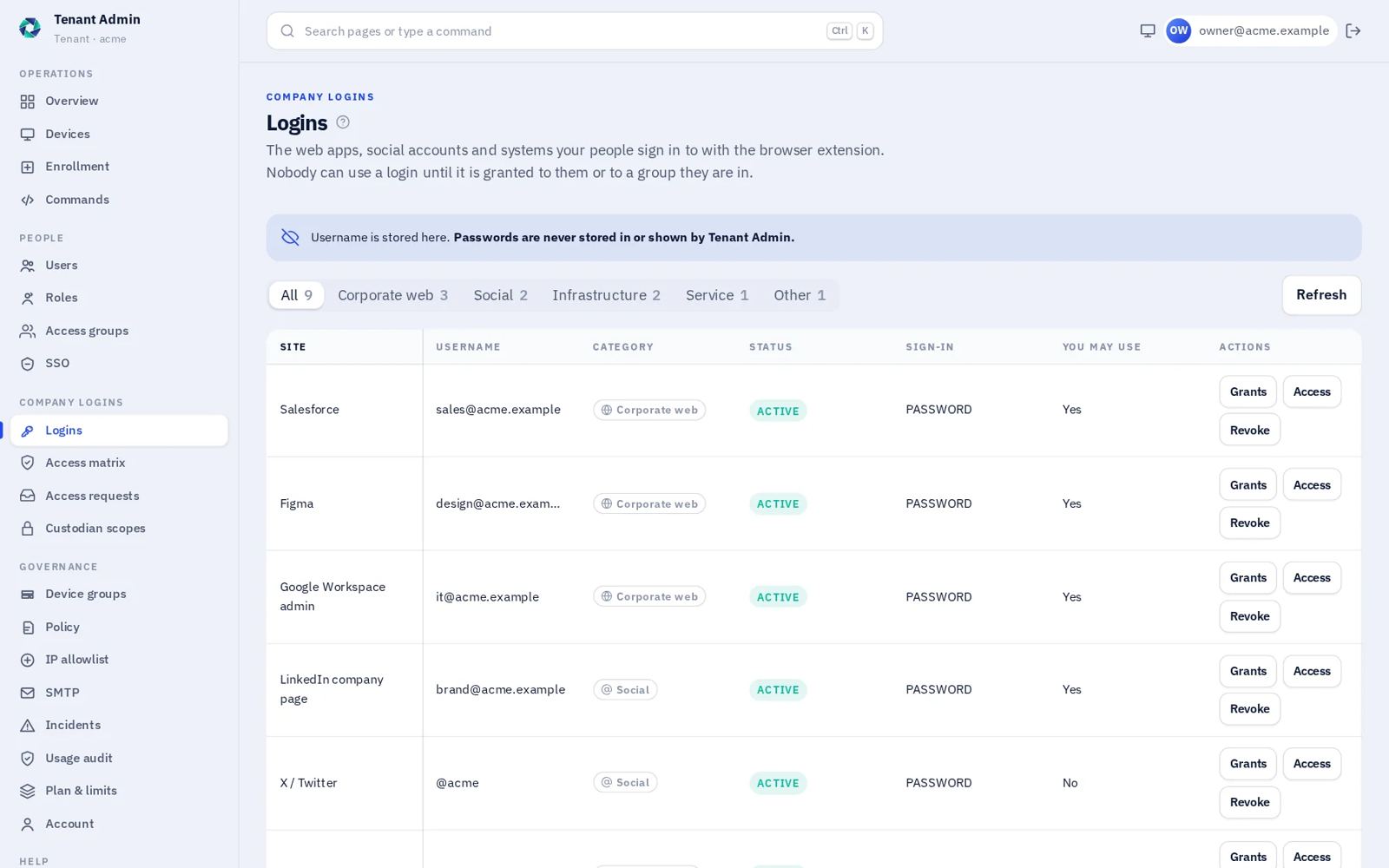
Trustwelt Tenant Admin company logins, listed by site and username

Tenant Admin

People, roles, company logins, the access matrix, devices and policy for one organisation, on its own address with its own sign-in.

Company logins

Grant use of a login. Keep the password out of everyone's hands.

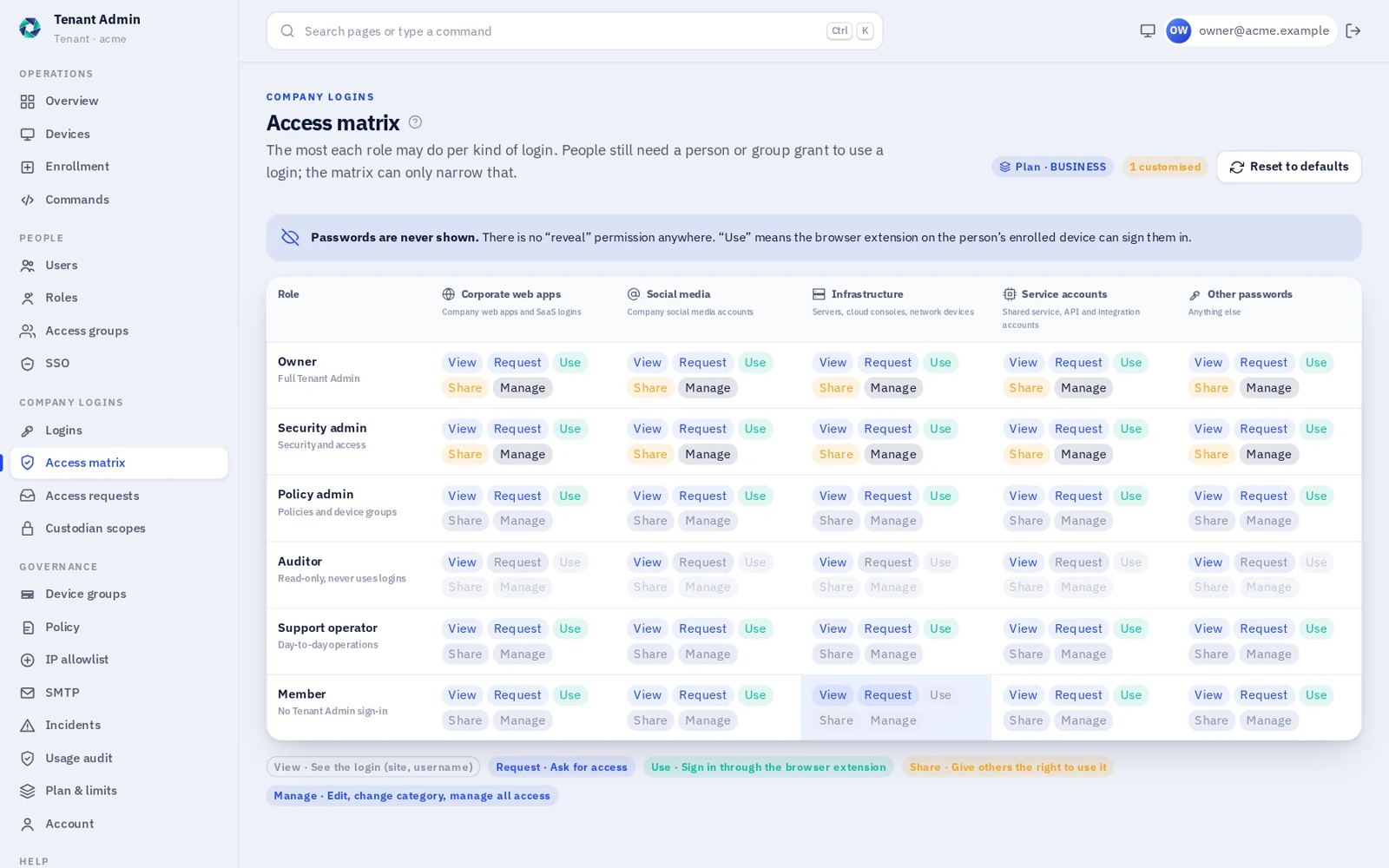
Tenant Admin lists company logins by site and username, never by password. The access matrix sets the most each role may do for each kind of login. A person still needs a grant before they can use one.

Trustwelt access matrix: a row for each role, a column for each kind of login, and in each cell which of View, Request, Use, Share and Manage is allowed

View, request, use, share, manage

Five things a role may do with a kind of login. The matrix is the ceiling. A grant to a person or an access group such as “Marketing” or “Platform on-call” can only narrow it.

Use means sign in, not read

The person opens the site in a browser with the Trustwelt extension on an enrolled device and clicks the icon. The extension signs them in. There is no reveal permission for anyone, including the owner.

Requests with a reason

People ask for access in the Portal and say why. The managers of that login approve or deny it in Tenant Admin, and the person can follow the decision.

Usage audit, company items only

Every use of a company login is recorded for the organisation. A person's own passwords and cards never appear there, even on a laptop the employer provided.

Portal

What a member sees.

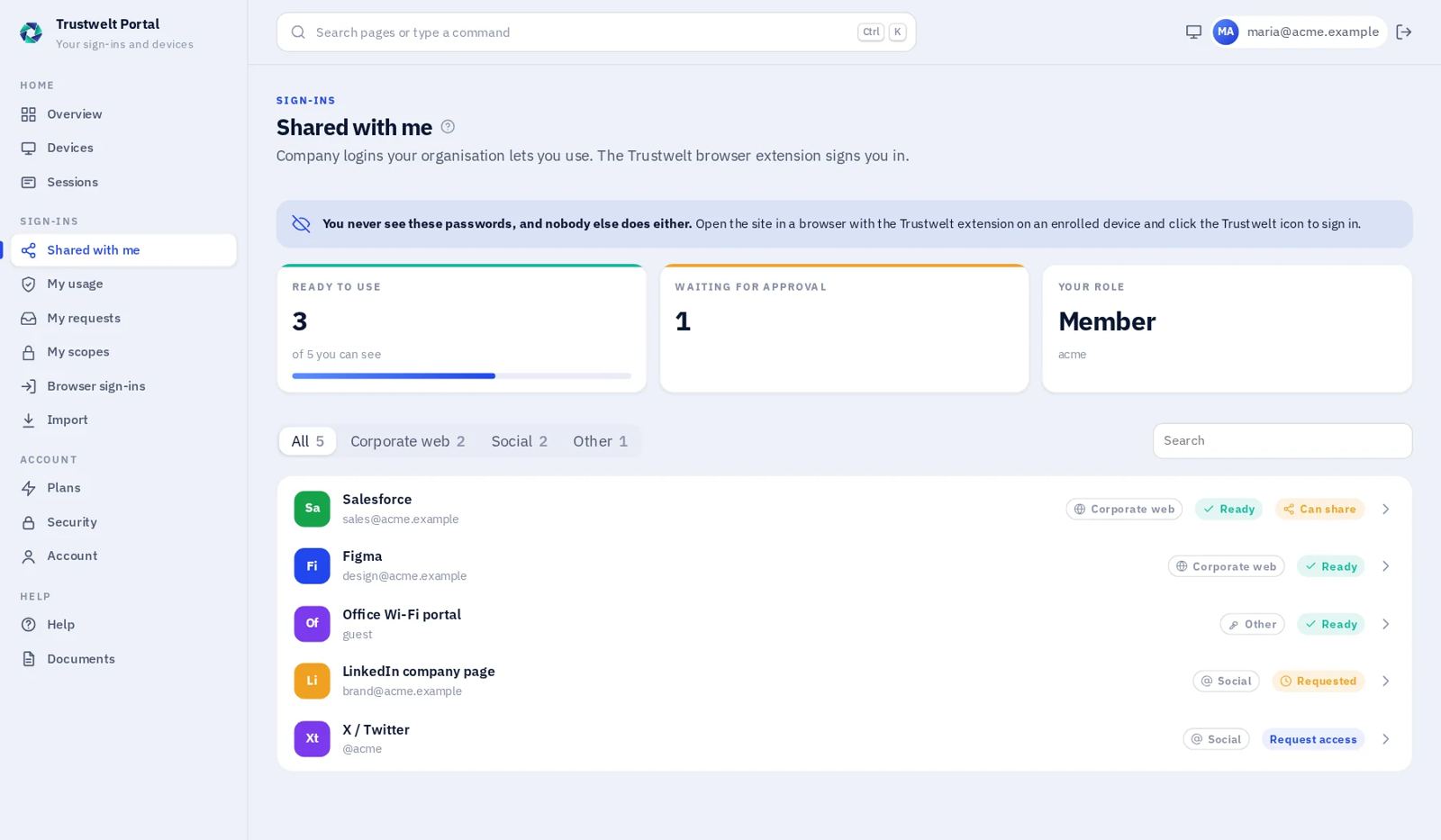
The Portal shows the company logins a person may use, the ones waiting for approval and the ones they could ask for. It does not show the rest of the organisation.

A member signs in with a password and a one-time code, or a security key. From there they can see their computers and sessions, add a new computer with a one-time token, and revoke a lost one at once.

Under Shared with me, each login carries its state: ready to use, waiting for approval, or available to request. Ready means the extension will sign them in on an enrolled device. Nothing on the page can display a password.

  • Company logins grouped by kind: corporate web, social, other
  • Access requests with a reason, and the decision when it comes
  • The person's own usage record, kept separate from the organisation's
  • Sign out everywhere in one step
Trustwelt Portal, Shared with me: three company logins ready to use, one waiting for approval and one that can be requested

Device trust

Identify. Assess. Decide. Enforce.

A correct password and an approved MFA prompt can still arrive from a laptop nobody has seen before. Trustwelt adds the device and its current state to the decision.

  • Enrol
  • Assess
  • Decide
  • Enforce
  • Remediate
  • Contain
  • Retire

Device identity

Enrolment gives each device its own cryptographic identity. The agent then talks to Trustwelt over mutually authenticated TLS. A stolen password on its own does not look like a trusted laptop.

Device posture

The agent reports typed signals: disk encryption, firewall and secure boot today, on Windows, macOS and Linux. A signal that cannot be read stays unknown. It is never counted as compliant.

Decision on the server

Policy turns identity, device and context into allow, remediate or restrict. People write the policy. Nothing the browser or the device says about itself is taken as trust.

Continuous, not one-time

Trust is designed to be evaluated again when the evidence changes: posture drifts, a device is revoked, a session is contained.

Remediation that is not a remote shell

When a device falls short, the person is shown what to fix. An administrator can send a registered, signed action to that one device. It cannot run arbitrary commands.

Incidents with the evidence kept

Contain a device or a session first. Incident records belong to one organisation, and every change to them is kept rather than overwritten.

Invariants: unknown is never trusted. MFA proves the person, not the laptop. Control actions are typed, signed and allowlisted. Tenant scope comes from the server, never from the request.

Vault Lite

A password vault that stays on your computer.

Vault Lite is the desktop part of Trustwelt. It needs no account. Logins, one-time codes, notes and payment cards live in one encrypted file on your own device.

Vault Lite: a list of logins on the left and one open on the right, with the password hidden and a one-time code counting down

Open it with a master password. Add a Secret Key to protect any copy of the file that leaves the computer. The vault runs in its own process and will not hand the whole vault to anyone, including the browser extension.

  • Argon2id key derivation and XChaCha20-Poly1305 encryption, with the whole file authenticated
  • Import from Chrome, Firefox, Edge, Bitwarden, 1Password and KeePass exports
  • Built-in one-time codes, and a password and passphrase generator
  • Payment cards without the security code. You type the CVV yourself, every time
  • A printable recovery kit. Trustwelt keeps no copy of it
  • A private activity record, encrypted with your vault key, that never contains a secret

The browser extension pairs once by comparing a code on both sides. After that it fills only the page you are on, and only on sites you have allowed. It also tells you when the browser is still saving passwords or cards itself.

Custodian scopes

Let finance hold the company cards.

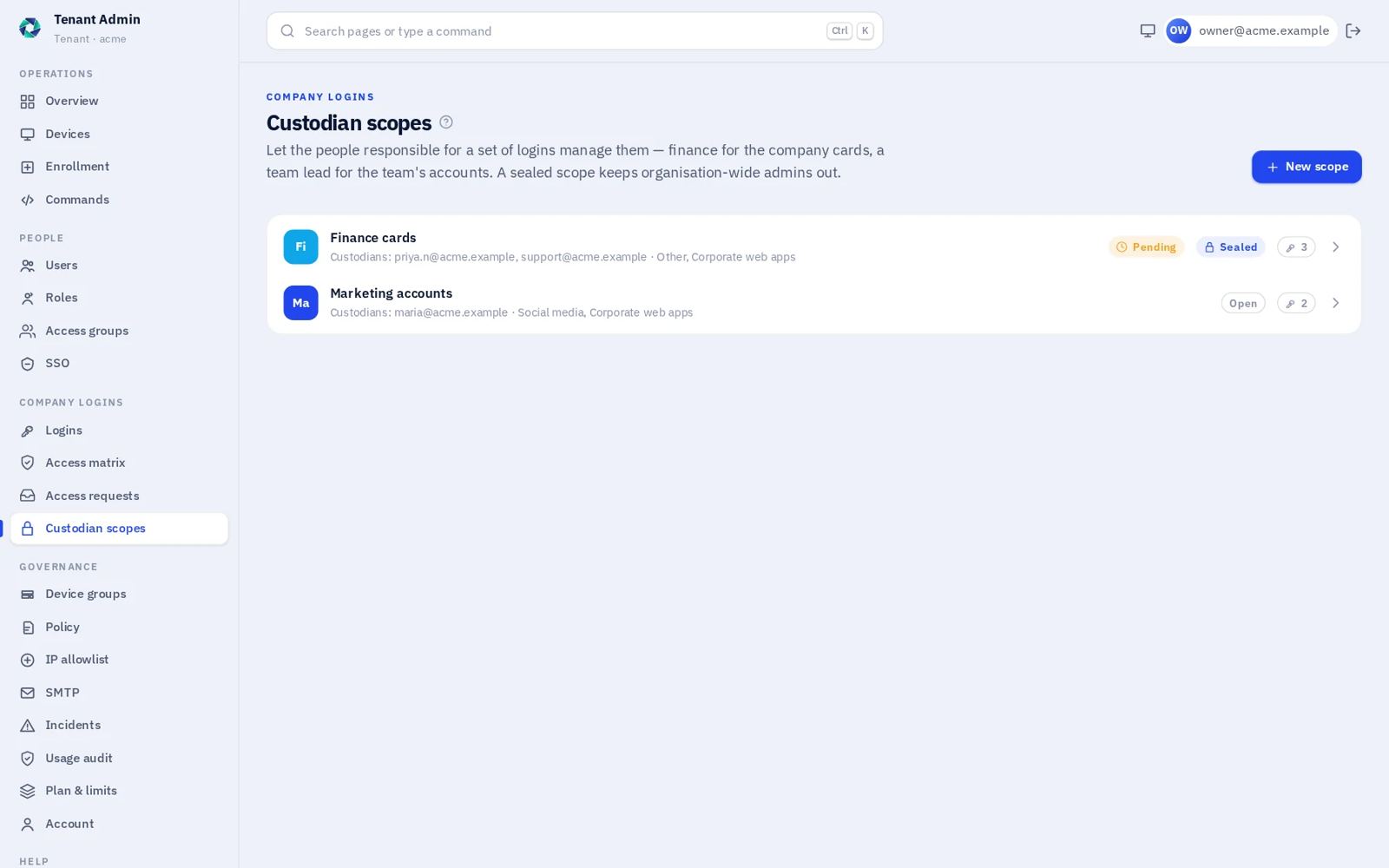
Not every shared login belongs to IT. A custodian scope gives a set of logins to the people responsible for them. Custodians add logins and share them with their team from the Portal. Members only ever get use of a login, never its password.

Seal the scope, and even organisation-wide administrators see only its name and how many logins it holds. Changing who the custodians are needs a second custodian to agree.

Custodian scopes in Tenant Admin: a sealed Finance cards scope with two custodians and a pending change, and an open Marketing accounts scope

Scenarios

Typical situations.

Marketing

The company LinkedIn page

Four people post from it. None of them knows the password, and when one leaves, their grant is removed rather than the password changed.

Platform

The cloud console

On-call engineers are an access group. The matrix lets that role use infrastructure logins but not share or manage them.

Finance

Cards the finance team controls

A sealed custodian scope. IT can see it exists, and how many items are in it, and nothing else.

Lost laptop

A device goes missing

Revoke the device from the Portal or Tenant Admin. Its certificate stops working, and its sessions can be contained with the evidence kept.

Contractor

Access for one project

The contractor asks for the supplier portal login with a reason. The login's manager approves. The extension signs them in on their enrolled device only.

Audit

Who used the account last week?

The usage audit answers it per company login and per person. Personal items are not in it, by design.

How the pieces fit

Security by architecture, not by promise.

A public website that never handles sign-in, a personal Portal, an admin console per organisation, a device control plane, and platform operations on a private network.

  • Each organisation has its own admin host; admin sessions are bound to it
  • Devices reach the control plane only with their own certificate
  • Platform operations are not reachable from the internet
  • Roles: owner, security admin, policy admin, auditor, support operator, member
  • Versioned HTTP APIs for the Portal, Tenant Admin and the desktop
  • Managed, multi-tenant service; dedicated or regional deployment is a conversation, not a published offer

What we publish: status labels rather than badges. No certification, audit or customer logo that we cannot show the evidence for.

FAQ

Questions about Trustwelt.

Is Trustwelt available now?

It is in private preview. There is no public sign-up. Organisations that want to try it on their own devices can send us a note.

Can an administrator reveal a shared company password?

No. Tenant Admin lists company logins by site and username. The password is not stored there and there is no reveal permission. People use a login through the browser extension on an enrolled device.

Does Trustwelt replace multi-factor authentication?

No. A second factor proves the person. Trustwelt adds the device and its current state to the same decision, so a correct password and an approved prompt from an unknown laptop still do not count as trusted.

Can the organisation see my personal passwords?

No. Personal items in Vault Lite stay on your computer, encrypted with your vault key. Only the use of company items appears in the organisation's usage audit.

Is remediation a remote shell?

No. Remediation is a short list of registered, signed actions sent to one device. It cannot run arbitrary commands.

Next step

Bring one shared login and one laptop.

We will walk the access matrix, the Portal and the device decision on that pair. Trustwelt is in private preview, so the walkthrough is on our tenant or yours by arrangement.